
Bij herhaalde account lockouts (account locked out meldingen) is het wenselijk om te achterhalen waar de oorzaak zit. Middels dit powershell script van The Sysadmin Channel kun je zoeken naar de plekken waar de lockout plaatsvindt.
#requires -Module ActiveDirectory

Function Get-AccountLockoutStatus {
<#
.Synopsis
    This will iterate through all your domain controllers by default and checks for event 4740 in event viewer. To use this, you must dot source the file and call the function.
    For updated help and examples refer to -Online version.


.DESCRIPTION
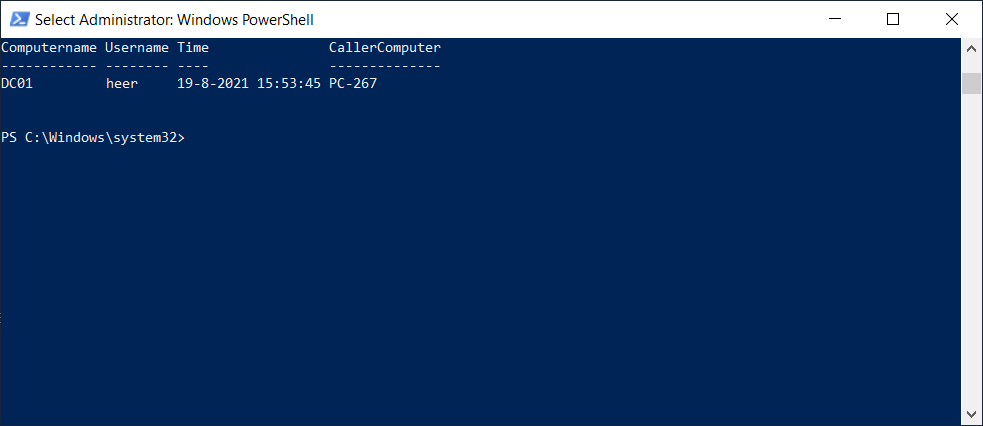
    This will go through all domain controllers by default and check to see if there are event ID for lockouts and display the information in table with Username, Time, Computername and CallerComputer.
    For updated help and examples refer to -Online version.


.NOTES
    Name: Get-AccountLockoutStatus
    Author: theSysadminChannel
    Version: 1.01
    DateCreated: 2017-Apr-09
    DateUpdated: 2017-Apr-09

.LINK
    https://thesysadminchannel.com/get-account-lock-out-source-powershell -


.PARAMETER ComputerName
    By default all domain controllers are checked. If a ComputerName is specified, it will check only that.

    .PARAMETER Username
    If a username is specified, it will only output events for that username.

    .PARAMETER DaysFromToday
    This will set the number of days to check in the event logs.  Default is 3 days.

    .EXAMPLE
    Get-AccountLockoutStatus

    Description:
    Will generate a list of lockout events on all domain controllers.

    .EXAMPLE
    Get-AccountLockoutStatus -ComputerName DC01, DC02

    Description:
    Will generate a list of lockout events on DC01 and DC02.

    .EXAMPLE
    Get-AccountLockoutStatus -Username Username

    Description:
    Will generate a list of lockout events on all domain controllers and filter that specific user.

    .EXAMPLE
    Get-AccountLockoutStatus -DaysFromToday 2

    Description:
    Will generate a list of lockout events on all domain controllers going back only 2 days.

#>

    [CmdletBinding()]
    param(
        [Parameter(
            ValueFromPipeline=$true,
            ValueFromPipelineByPropertyName=$true,
            Position=0)]

        [string[]]     $ComputerName = (Get-ADDomainController -Filter * |  select -ExpandProperty Name),

        [Parameter()]
        [string]       $Username,

        [Parameter()]
        [int]          $DaysFromToday = 3

    )


    BEGIN {
        $Object = @()
    }

    PROCESS {
        Foreach ($Computer in $ComputerName) {
            try {
                $EventID = Get-WinEvent -ComputerName $Computer -FilterHashtable @{Logname = 'Security'; ID = 4740; StartTime = (Get-Date).AddDays(-$DaysFromToday)} -EA 0
                Foreach ($Event in $EventID) {
                    $Properties = @{Computername   = $Computer
                                    Time           = $Event.TimeCreated
                                    Username       = $Event.Properties.value[0]
                                    CallerComputer = $Event.Properties.value[1]
                                    }
                    $Object += New-Object -TypeName PSObject -Property $Properties | Select ComputerName, Username, Time, CallerComputer
                }

            } catch {
                $ErrorMessage = $Computer + " Error: " + $_.Exception.Message

            } finally {
                if ($Username) {
                        Write-Output $Object | Where-Object {$_.Username -eq $Username}
                    } else {
                        Write-Output $Object
                }
                $Object = $null
            }

        }

    }


    END {}

}