Ga naar de inhoud

Steijvers.com : over IT, eten en plaatjes draaien

  • Home
  • Koken met Steijvers
  • Tech
    • Windows Server
    • Exchange Server 2019
    • Exchange Server SE
    • Powershell
    • Veeam
    • VMware
    • Hyper-V
    • Proxmox
    • UniFi
    • Hewlett Packard Enterprise
  • Vinyl/Vintage Audio
    • Thorens
    • Dual
  • Fotoblog
  • Over mij
    • Bas
    • Curriculum Vitae
    • Contact
  • Links
logo windows server

Legal notice bij aanmelding

1 juni 2022 Bas Tech

Wanneer je snel een legal notice wil instellen op een systeem, kun je dat via regedit doen onder HKLM\SOFTWARE\Microsoft\Windows\CurrentVersion\Policies\System. Voeg daar de tekenreeks waardes legalnoticecaption en legaltext toe. Nog sneller is powershell…

Set-ItemProperty -Path HKLM:\SOFTWARE\Microsoft\Windows\CurrentVersion\Policies\System -Name legalnoticecaption -Value "Property of SUSSE.NET"
Set-ItemProperty -Path HKLM:\SOFTWARE\Microsoft\Windows\CurrentVersion\Policies\System -Name legaltext -Value "Do not harm innocent computers and listen carefully to your local sysadmin."
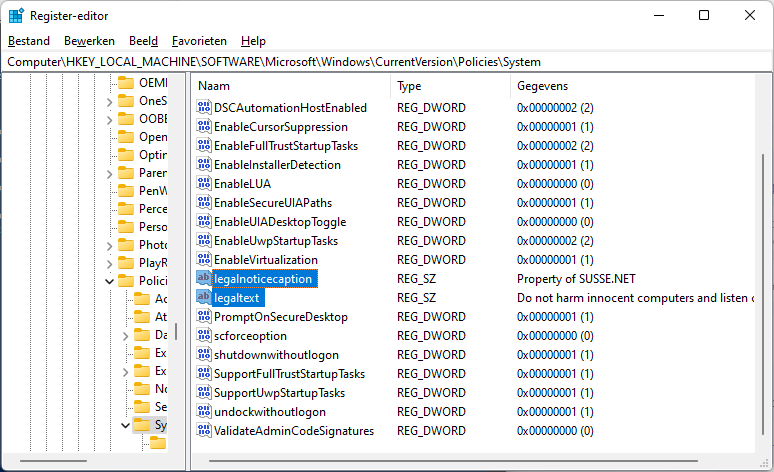
loginlogonnoticewindows

Bericht navigatie

Vorige bericht:OBI Sailing Event (Corfu)
Volgende bericht:Misbruik MSDT URL Protocol via WORD documenten
  • LinkedIn

Onlangs toegevoegd

  • HPE Service Pack for ProLiant 2025.11.00.00
  • Virus & Threat protection uitschakelen
  • Veeam : the request does not have valid authentication credentials
  • fijne feestdagen!
  • VMware ESXi 8.0U3h
  • Je eigen UniFi OS Server opzetten
  • Veeam : Failed to enable DC SafeBoot mode
  • VMware Tools bijwerken op een standalone ESXi host
  • VMware Tools bijwerken via Lifecycle Manager
  • function Get-FailedLogons

Archieven

© 2000 – 2026 Familie Steijvers, onderdeel van SUSSE.NET

WordPress thema: Poseidon door ThemeZee.